Human in the Loop Method: A Black Box Approach to AI-Assisted Coding
Published on
AI-assisted coding can significantly accelerate software development, but the quality of the results depends heavily on how we interact with the AI. In this article, we share the method we use every day at Tonjoo to leverage AI-assisted coding when developing applications with Next.js, Laravel, and WordPress. This approach is framework-agnostic, meaning its principles can be applied to almost any tech stack.
Table of Contents
Why Use This Method?
One of the most important decisions is determining how much control to give the AI throughout the development process. In general, there are three common approaches to working with coding agents.
- Fully Automated (Human Outside the Loop): Simply provide a Product Requirements Document (PRD), and the AI handles everything from start to finish. This approach works well for simple tasks but is less suitable for complex projects.
- Semi-Automated (Human in the Loop): The AI completes the task, while the developer reviews the output at each checkpoint (between commits). This is the approach we’ll focus on in this article.
- Assisted: The developer approves every action performed by the AI. While this approach provides maximum control, it also makes the development process slower.
Among these three approaches, we consider Human in the Loop to be the sweet spot, providing the right balance between automation and human oversight at every checkpoint.
Black Box Approach
The following illustration shows how the Black Box approach is applied in an AI-assisted coding workflow.


In software engineering, Black Box Testing is a testing technique that evaluates software functionality without examining how the underlying code is implemented. In other words, the tester does not need to understand the application’s code structure, algorithms, or internal logic. They provide an input, observe the resulting output, and determine whether it meets the expected requirements.
We apply the same principle to our AI-assisted coding workflow. The difference is that the “black box” is no longer the application being tested, but the implementation process carried out by the AI agent.
In other words, while the AI is working on a task, we don’t need to inspect every line of code it generates right away. Instead, we treat it as a system that receives input and produces output.
In simple terms, the workflow looks like this:
- The developer provides input to the AI, such as a task description, error logs, API responses, screenshots, or project context.
- The AI processes the information and implements the required changes in the codebase.
- The developer runs the application, tests the implemented feature, and evaluates whether the resulting output meets the expected outcome.
If the output does not yet meet expectations, there is no need to perform an in-depth code review right away. Instead, the developer gathers relevant information such as error messages, updated screenshots, or unexpected application behavior, and provides it back to the AI as new input. The AI then revises its implementation, and the validation process is repeated.
This cycle continues until the output meets the intended requirements. By adopting this method, developers spend more time evaluating results than monitoring every step the AI takes during implementation. As a result, the development process becomes more effective and efficient, leading to higher overall productivity.
Human-in-the-Loop Implementation Steps
Set Up Agent Standards
The first step before using a coding agent to work on your codebase is to ensure that it has sufficient understanding of the project.
Unlike developers, who can gradually learn a project’s structure over time, a coding agent only knows the information that is explicitly provided to it. Without clear context, it is more likely to produce inconsistent implementations, use patterns that differ from the existing codebase, or even violate the development standards established by the team.
To prevent this, we always begin by creating AGENTS.md file along with any supporting documentation in the repository. This file serves as a guide for the coding agent, defining the project’s rules, conventions, and overall characteristics so that it can generate more consistent implementations.
Most modern coding agents, such as Claude Code, Codex, and OpenCode, can generate AGENTS.md file automatically. In most cases, this can be done using a command such as /init within the coding agent session.
By default, Claude Code reads the
CLAUDE.mdfile. To ensure the same configuration can be used across different coding agents, the Tonjoo team typically adds the following instruction toCLAUDE.md:always read AGENTS.md
With this approach, AGENTS.md becomes the primary source of project documentation, while CLAUDE.md simply instructs Claude Code to always refer to that documentation.
Keep in mind that the contents of AGENTS.md should be tailored to the technologies used in your project. The goal is not to explain the entire codebase, but rather to provide key rules that the AI must adhere to during the development process.
For example, here are some of the guidelines we typically include.
Next.js
- Guidelines for using environment variables
- Rules prohibiting the use of
NEXT_PUBLIC_*for specific use cases (see our article on the pitfalls of usingNEXT_PUBLIC_*in production) - Folder structure
- Data fetching conventions
Laravel
- Standards for using Artisan commands
- Service and Repository structure
- Migration conventions
WordPress
- Plugin and theme development standards
- Data escaping and sanitization guidelines
- Hook naming conventions
In addition, AGENTS.md doesn’t have to be perfect from the start. It can evolve alongside the project’s needs and be updated over time. In fact, AGENTS.md file generated automatically by a coding agent is often a solid starting point.
Beyond documenting technical conventions, AGENTS.md is also the ideal place to define your team’s engineering policies.
Engineering policies are a collection of technical rules and decisions agreed upon by the team to ensure that both developers and AI agents produce consistent code. By documenting these policies in AGENTS.md, the coding agent learns not only how to generate syntactically correct code, but also how to follow the engineering standards established for the project.
For example, when developing Next.js applications, Tonjoo has a policy of minimizing the use of NEXT_PUBLIC_* variables. This is because variables with the NEXT_PUBLIC_ prefix are exposed to the client and have build-time behavior, which can introduce various challenges when the application is deployed to a production environment.
For that reason, the coding agent needs to be aware of these policies from the outset, so it does not automatically use NEXT_PUBLIC_* when generating new implementations. Instead, it is guided to follow the patterns that have already been established as project standards.
The more thoroughly your engineering policies are documented, the less likely the coding agent is to generate code that conflicts with your organization’s internal standards. In other words, AGENTS.md serves not only as project documentation, but also as a way to capture and transfer the engineering team’s ideas, practices, and way of thinking to the coding agent.
Create an Implementation Plan (Use Plan Mode)
Once the AI understands the project’s standards via AGENTS.md, the next step is to ask it to draft an implementation plan first.
Try to avoid asking the AI to generate code immediately. Instead, use Plan Mode so the AI can analyze requirements, understand the codebase, identify the files to be modified, and outline the implementation steps
For example, you can use a prompt like the following.
Your job is to create a plan to create a report menu on the admin page
– Report
– User Usage (named api key usage in the screenshot)
– Model Usage
Create a simplified diagram (text) based on two screenshots I provide
The User Usage report will have
– filter (date)
– model
– name (user)
The model usage will have a filter
– date
– model
– name (user)
You may use a temporary one-time script to “fake” data on database spend logs
model SpendLogs {
id String @id @default(uuid())
chatId String
messageId String? @default(“”)
model String @db.VarChar(100)
spend Float @default(0) -> already in dollars (this is the main interest for cost)
total_tokens Int @default(0)
prompt_tokens Int @default(0)
completion_tokens Int @default(0)
date DateTime @default(now())
@@map(“spend_logs”)
}
Create 100 random data
Read config.yml (or ask user to provide) to read available model name
Rules
– must have RBAC, only admin can see
– implement backend (api) rbac protected
– implement frontend
– confirm user for relevant chart library if user has preferences
For your information, the AI does not have complete knowledge of your project. It can only make decisions based on the context provided through your prompts and supporting documentation. Therefore, the more complete the information you provide, the more likely the AI is to generate an implementation that meets your requirements.
At Tonjoo, we even have dedicated Technical Analysts who help prepare documentation such as Entity Relationship Diagrams (ERDs), swimlane diagrams, user stories, and other technical documents.
Within the Black Box approach, this documentation serves as one of the primary sources of context when crafting prompts. Developers don’t need to explain every requirement from scratch in each conversation. Instead, they simply attach the relevant documentation so the AI can understand the project context, implementation constraints, and engineering standards it is expected to follow.
With well-prepared documentation, prompting becomes more focused, implementation results become more consistent, and developers can more easily validate whether the AI’s work meets both the project requirements and the team’s engineering standards. In general, the richer the context you provide, the better the quality of the AI’s output.
However, this does not mean that all information must be included in a single prompt. If a feature has a broad scope or involves numerous changes, it is better to break it down into several smaller tasks. The goal is to enable the AI to remain focused on a single objective during each iteration, making the output easier to review and refine if necessary.
Review and Validate the Implementation Plan
This is the most important checkpoint in the Human-in-the-Loop approach. Before the AI starts making changes to the codebase, take the time to review and evaluate the implementation plan it has prepared. The goal is to ensure that the AI fully understands the requirements and has chosen the right approach.
Here are a few key questions to consider:
- Does the plan align with the intended goals?
- Could any of the proposed changes potentially break existing features?
- Is the proposed approach reasonable and consistent with the project’s architecture?
If any part of the plan seems questionable, don’t hesitate to discuss it with the AI. Provide feedback, ask questions, or challenge the reasoning behind its proposed approach until it produces a more suitable implementation plan.
You can even ask another coding agent to review the plan before implementation begins. This provides an additional perspective and helps identify potential issues that might otherwise go unnoticed.
Execute the Implementation (Use Auto Accept)
Once the implementation plan has been approved, create a new branch so that all AI-generated changes remain isolated from the main branch. This allows the implementation to be reviewed, tested, or even discarded without affecting the primary codebase.
Next, run the coding agent in Auto Accept mode. This allows the AI to execute the approved implementation plan without requiring confirmation for every action it performs.
At the time of writing (July 2026), most modern coding agents are capable of handling a wide range of development tasks autonomously, including:
- Writing and updating code
- Running build or lint processes to validate the implementation
- Starting a local development server
- Creating or updating tests as needed
At this stage, the primary objective is not to verify that all business requirements have been satisfied. Instead, the focus is on ensuring that the implementation is technically sound. The AI should produce code that compiles successfully, is free of compilation errors, and does not introduce runtime errors that would block further development.
Verification of the application’s business logic is under the developer’s responsibility during the next stage through manual testing. This aligns with the Black Box approach, where the implementation is evaluated based on the application’s behavior and output, rather than solely on the code generated by the AI.
Manual Verification with the Black Box Approach
The fifth stage is the core of the Human-in-the-Loop approach. Once the AI has completed the implementation, it’s time to run the application and verify the results manually.
Open the application in your browser, execute the scenarios related to the newly implemented feature, and confirm that the behavior matches the intended requirements. Focus your testing on the most critical aspects, such as:
- Does the feature behave as intended?
- Are there any errors or unexpected behaviors?
- Do the changes affect other features that were previously working correctly?
This is the essence of the Human-in-the-Loop approach. The AI is responsible for implementing the solution, but the final decision about whether the result is correct remains with the developer.
If you encounter any issues, avoid fixing them manually right away. Instead, gather relevant information such as error logs, screenshots, API responses, or the steps required to reproduce the issue, and provide it to the AI as new context so it can iterate on the implementation.
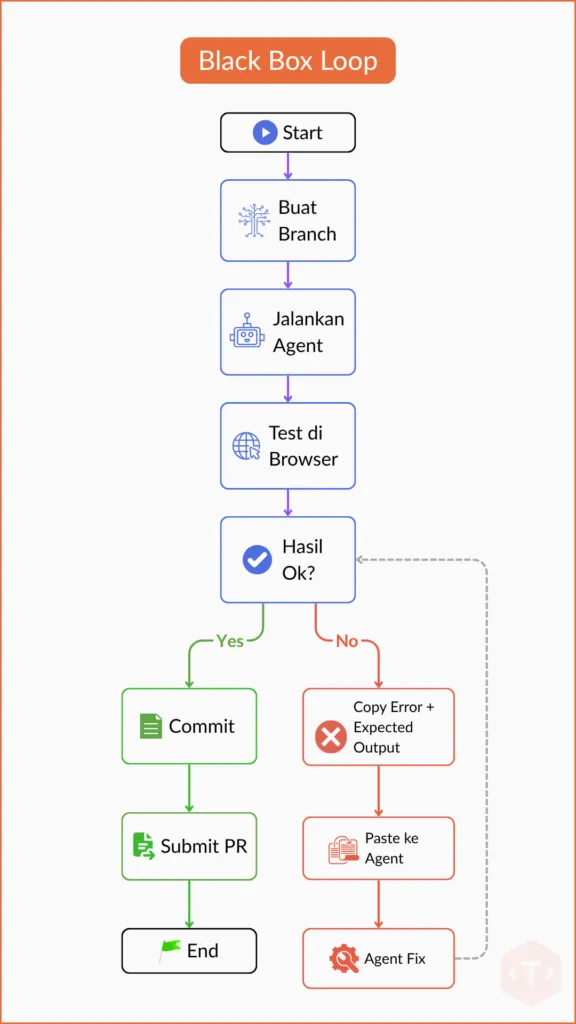

In practice, the implementation of AI does not always run perfectly on the first attempt. When you open the application in your browser and test a newly implemented feature, you may still encounter runtime errors, incorrect UI behavior, or business logic that does not function as intended.
This is a normal part of the Human-in-the-Loop process. At this stage, the developer’s role is not to fix the code manually, but to provide clear feedback to the AI so it can perform the next iteration.
Based on our experience, this approach is often faster than relying solely on automated testing immediately after the AI finishes writing the code. Issues discovered during manual testing usually provide more specific context about what went wrong, enabling the AI to generate more accurate fixes.
For example, when you ask the AI to create a Report page. After the implementation is complete, you open the application in your browser and navigate to the page. Instead of loading successfully, the application displays the following message:
error di halaman report:

Transform failed with 1 error:
app/composables/useAuth.ts:103:8: ERROR: Expected "finally" but found "else"
The same principle applies to other frameworks as well. For example, in a Laravel project, simply copy the stack trace shown below and provide it to the AI as context so it can identify the issue and generate an appropriate fix.
error saat buka /admin/report:

SQLSTATE[42S02]: Base table or view not found: 1146
Table 'app.spend_logs' doesn't exist
After receiving the feedback, the AI analyzes the cause of the error, updates the implementation, and asks you to test the application again. This cycle continues until the implementation produces the expected results.
One more practice we consider essential is avoiding automatic commits during this iteration process.
At this stage, the AI is still experimenting with fixing errors and refining the implementation. If every small change is committed automatically, your Git history will quickly become cluttered with low-value commits such as “fix error,” “fix again,” or “final fix.”
As a result, the commit history becomes harder to navigate, and rolling back changes when problems arise is more difficult.
For this reason, commits remain the developer’s responsibility in our workflow. A commit should only be created after the implementation has been manually verified and is ready to be recorded as a complete, meaningful change.
One more important point when providing feedback to the AI: don’t just copy and paste raw error logs. Instead, follow the Black Box principle by including the input (current state) and expected output (the intended result) so that the AI understands the context of the problem.
For example:
Current input (issue):
- Open the /admin/report page
- The following error appears:
  Transform failed with 1 error:
  app/composables/useAuth.ts:103:8: ERROR: Expected "finally" but found "else"

Expected output:
- The Report page displays the User Usage table
- Users can filter the data by date and model

(Attach a screenshot of the error.)
With this format, the AI has a much clearer understanding of both what is currently happening (the input) and what you want to achieve (the expected output). Without the expected output, the AI may successfully eliminate the error but still produce an implementation that does not meet your actual requirements.
Whenever possible, include a screenshot as well. In many cases, visual context helps the AI understand the issue more quickly than reading dozens of lines of log output.
Continue this cycle until the implementation fully meets your expectations. Once the feature is working correctly and has been manually verified, you can then create a commit.
The Black Box Loop is inherently iterative, but every iteration should have a clear exit condition. Don’t let the AI continue repeating the same cycle without making meaningful progress.
As a practical rule of thumb, if the AI still fails to resolve the same issue after two or three iterations, it’s best to stop the loop. Avoid repeatedly feeding the AI the same error in the hope that it will eventually find the right solution.
Based on our experience, this usually indicates that the root cause is no longer the debugging process itself, but rather that the task is too broad or the implementation plan is flawed. As a result, the AI tends to get stuck solving the same problem without making meaningful progress. When this happens, we typically reset the branch to a clean state, break the task into smaller, more manageable pieces, and start a new iteration with a more focused and well-defined implementation plan.
This approach is more effective than continuing the same loop and hoping the AI will eventually arrive at the correct solution after multiple attempts.
Commit After Verification Is Complete
Before creating a commit, make sure the implementation fully matches the application’s requirements. Developers can refer to the technical documentation prepared by the System Analyst, such as user stories, ERDs, and other supporting documentation. This step helps ensure that every AI iteration remains aligned with the intended objectives.
Once the feature is working correctly, free of runtime errors, and the business workflow has been manually verified, it’s time to open the black box.
Opening the black box does not mean reviewing every line of code. Instead, focus on areas with the highest risk, such as:
- Database migrations: Verify that schema changes match the ERD, since database issues are much more difficult to fix once they reach production.
- Authentication and security: Review code related to RBAC, session management, and input validation, as issues in these areas are often not apparent through browser testing alone.
- Code smells: Ensure the code remains modular and maintainable. If the AI generates implementations that are overly large or repetitive, ask it to refactor the code, for example, by extracting helper functions, introducing base classes, or applying reusable design patterns.
Once all changes meet both the project’s technical standards and business requirements, create a commit and proceed with the Pull Request (PR) process.
Human in the Loop in the Black Box
The Black Box Loop that we discussed earlier represents only the initial stage of the workflow. At Tonjoo, the Human-in-the-Loop principle doesn’t end once the code has been generated. Instead, it continues to be applied until the feature is fully validated and ready for production.
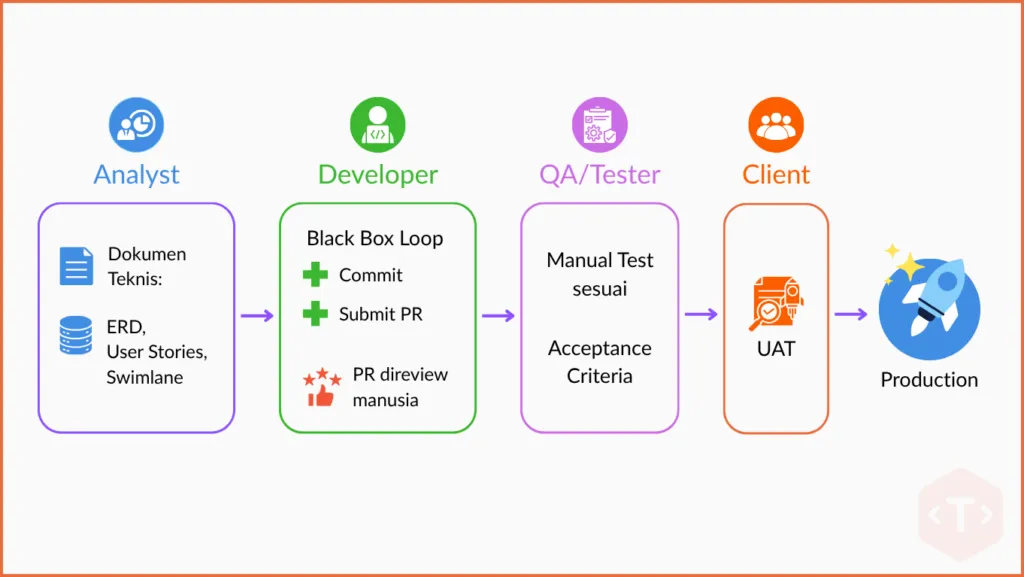
1. Analysts Prepare the Technical Documentation
Before development begins, the Analyst prepares technical documentation such as ERDs, user stories, swimlane diagrams, and other supporting materials. These documents serve as the source of truth, helping developers craft prompts and validate the AI’s implementation.
2. Pull Requests Are Reviewed by Humans
Once a Pull Request (PR) has been created, the code review is performed by another developer, and it’s not by AI. The goal is not to inspect every line of code, but to focus on high-risk areas such as database migrations, security, dependencies, and compliance with the application’s architecture.
3. Manual Testing by QA/Testers
After the feature has been merged, it is tested again manually by QA/Testers against the defined acceptance criteria. This stage helps uncover scenarios and edge cases that may have been missed during the developer’s own testing.
4. User Acceptance Testing (UAT) Before Production
Before a feature is deployed to production, it goes through User Acceptance Testing (UAT) with the client or key stakeholders. This is to ensure that the implementation truly meets the business requirements, and not just that it passes technical validation.
As a result, every feature goes through five layers of human validation: Analyst (technical documentation), Developer (Black Box Loop), Reviewer (Pull Request), QA/Tester (acceptance criteria), and User Acceptance Testing (UAT). While AI can assist with generating much of the implementation, every change is still reviewed and validated by humans before it reaches production.
This is what Human in the Loop means at Tonjoo: AI acts as a development partner, and it is not a replacement for developers.
Build High-Quality, Production-Ready Applications with Tonjoo
The Human-in-the-Loop method is not just about making AI work faster—it’s about ensuring that humans remain involved at the most critical decision points throughout the development process.
At Tonjoo, human involvement begins with preparing technical documentation, continues through implementation planning, validating AI-generated results, conducting code reviews, testing against acceptance criteria, and finally performing User Acceptance Testing (UAT) before a feature is deployed to production. AI may generate thousands of lines of code inside the black box, but the direction of development, the quality of the implementation, and the final decisions always remain in human hands.
Based on our experience, this combination delivers the best results. AI accelerates operational tasks, while humans remain responsible for decision-making, validation, and quality assurance.
If your organization is looking to adopt AI-assisted coding or establish a more structured engineering workflow, the Tonjoo team is ready to help. From requirements analysis and application development to deployment, we can support your entire software development process with a proven engineering workflow enhanced by AI-assisted coding.
Contact us today and let’s build your next application with confidence.


Updated on August 3, 2026 by Anisa K.