Using NEXT_PUBLIC_ in Production Environments: What You Need to Know!
Published on
Through this article, we’d like to share our experience developing applications based on Next.js. You can explore some of the projects we’ve completed on our portfolio page. Across those projects, we discovered one seemingly simple detail that can have a significant impact on the deployment process: the use of NEXT_PUBLIC_.
In simple terms,
NEXT_PUBLIC_is a prefix used on to environment variables so their values can be accessed by code running on the client side (the browser). This mechanism makes it easier for applications to access configuration that must be available to the client, such as API URLs or third-party service configurations.
During development, applications are typically built in a development environment, then go through a build process before being deployed to testing or production environments. This approach is commonly known as “build once, deploy everywhere,” meaning the same build result can be used in various environments without needing to rebuild. Although it sounds simple, this concept is closely related to how Next.js handles NEXT_PUBLIC_, and if you can’t understand it well, it can cause problems when the application is run in production.
For example, to define the API endpoint, you can create an environment variable named API_URL. Its value can then be adjusted based on the target environment, for example, API_URL=http://api-dev.website.com in the development environment and API_URL=https://api-prod.website.com in the production environment. With this approach, the application code itself does not need to change, since only the value of the environment variable differs between environments.
However, this mechanism doesn’t always run smoothly in Next.js, especially when using the NEXT_PUBLIC_ environment variable. When running the npm run build process, Next.js will embed the values of some environment variables directly into the build results stored in the .next folder. As a result, the value becomes hardcoded, which cannot be changed simply by replacing the environment variable after the build process is complete.
This condition means every environment, such as development, staging, and production, potentially requires different build results. For development and operations teams, this approach is certainly less than ideal because it adds complexity to the deployment process and contradicts the build once, deploy everywhere principle.
So, how can we still apply this principle in a Next.js application? We will discuss several guidelines that can be used so that a single build result can still be deployed to various environments without needing to rebuild.
Table of Contents
Pitfall 1: Credentials Leaking Because of Using NEXT_PUBLIC_
One common pitfall is storing credentials or other sensitive data in NEXT_PUBLIC_ environment variables, such as API keys, access tokens, passwords, authentication secrets, or other confidential information. This is especially common in applications generated through Vibe Coding.
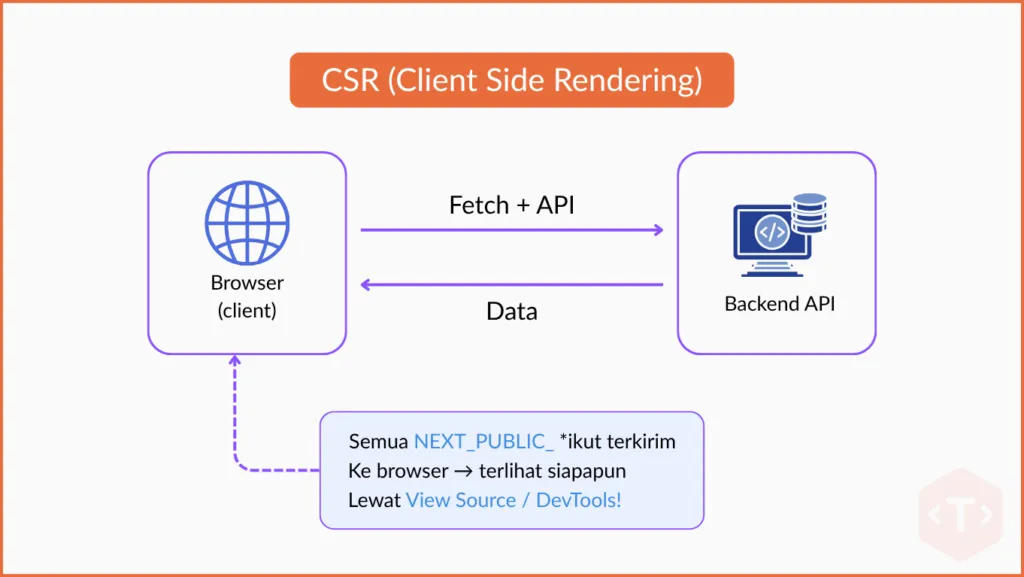
To understand why this has the potential to create risks, we need to know the difference between Client-Side Rendering (CSR) and Server-Side Rendering (SSR).
In CSR, the rendering process takes place in the browser, so code running on the client side can only access environment variables prefixed with NEXT_PUBLIC_. Because that code is sent to the browser, all of its values can also be seen by the user.
So, it is best to avoid using the NEXT_PUBLIC_ environment variable to store credentials, access tokens, or other sensitive data.
Conversely, in SSR, the rendering process is done on the Next.js server before the page is sent to the browser. Because it runs on the server side, the application can access secret environment variables without exposing their values to the user. This is why credentials and sensitive configurations should only be used in code running on the server, not in a NEXT_PUBLIC_ environment variable.
To address credential leakage issues, one of the commonly used approaches is proxy rewrites. Through this mechanism, access to the Backend API is redirected through the Next.js server, so the frontend only receives the data it needs, while credentials such as API keys or access tokens remain safe on the server side and are never sent to the browser. This is why credentials and other sensitive configuration should only be used in server-side code, not in NEXT_PUBLIC_ environment variables.

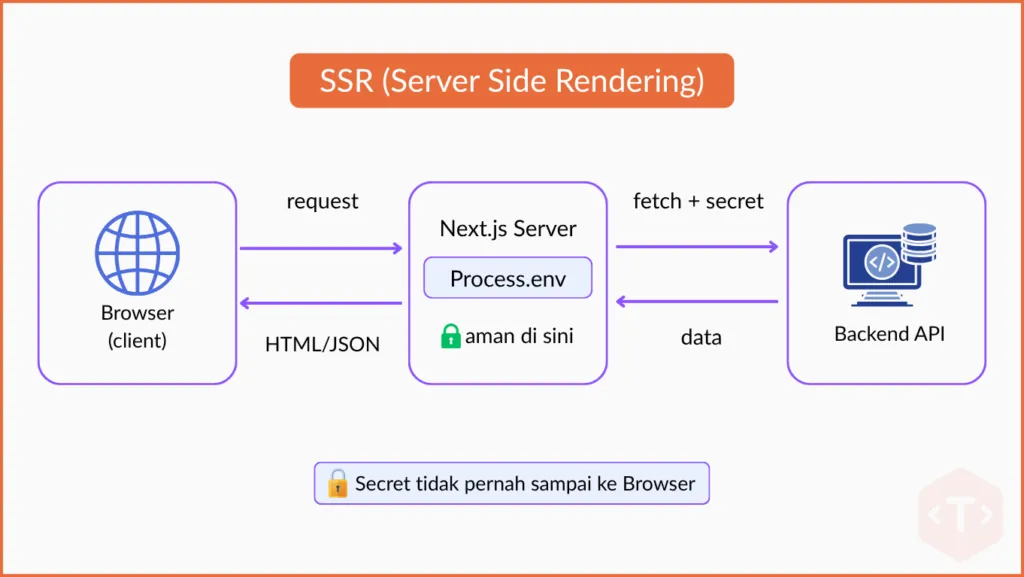
To address the risk of credential leaks, one commonly used approach is proxy rewrites. With this mechanism, requests to the Backend API are routed through the Next.js server. As a result, the frontend only receives the data it needs, while credentials such as API keys and access tokens remain securely stored on the server and are never exposed to the browser.
The implementation of proxy rewrites differs slightly between the Pages Router and the App Router. For example, in the Pages Router, you can create a proxy using a catch-all API Route, as shown below.
// pages/api/[...path].js
import httpProxyMiddleware from "next-http-proxy-middleware";

// Jangan parse body pada route proxy
export const config = { api: { bodyParser: false } };

export default (req, res) => {
  // process.env dibaca di dalam route = runtime, bukan build time
  const TARGET = process.env.BACKEND_BASE_URL;
  if (!TARGET) {
    return res.status(500).json({ message: "BACKEND_BASE_URL is not set" });
  }

  return httpProxyMiddleware(req, res, {
    target: TARGET,
    changeOrigin: true,
    pathRewrite: [{ patternStr: "^/api", replaceStr: "" }],
  });
};
In practice, a proxy can be extended to support a variety of use cases, such as routing robots.txt and sitemap.xml requests to a CMS backend, proxying media or CDN assets, and forwarding headers such as Host and X-Forwarded-*.
Below is an example prompt that can be used to tailor the implementation to your specific requirements.
Prompt:
Create a catch-all proxy API route for the Next.js Pages Router in pages/api/[...path].js using next-http-proxy-middleware.
Objectives:
- All proxy targets are read from
process.envinside the handler (runtime, not build time) so one build can be used in all environments. - Routes in the exclude list (e.g.,
/route-exclude-1,/route-exclude-2,/route-exclude-3) are not proxied and return 404; the rest are proxied to the target. - Forward headers
Host,X-Forwarded-Host,X-Real-IP,X-Forwarded-For,X-Forwarded-Protoso the backend thinks the request comes from the frontend domain
Recommended:
- Set
export const config = { api: { bodyParser: false } }. - Validate the required environment variables and return a
500response with a clear error message if empty. - Wrap the proxy in a
Promiseand handle errors properly to avoid sending duplicate responses.
Avoid:
- Do not read
process.envoutside the request handler or at the module scope. - Do not use
NEXT_PUBLIC_*under any circumstances. - Do not hardcode any URLs or domain names in the code.
Pitfall 2: Consider Using NEXT_PUBLIC_ in Production
At Tonjoo, we choose not to use NEXT_PUBLIC_ in production applications. It is not because this feature is less good, but because its build-dependent behavior requires extra attention during deployment. In the scenarios we face, this is less suitable for operational needs that prioritize configuration flexibility in every environment.
For frontend configurations that are not sensitive, such as feature flags or certain tag adjustments, we still choose an approach other than NEXT_PUBLIC_. Using that way, configuration can be changed at runtime without needing to rebuild.
As an alternative, we implement the Configurator Pattern:
- Create an api
/api/configusing SSR - CSR that needs variables can get values from
/api/config
// pages/api/config.js
// SSR — process.env dibaca ketika runtime, bukan ketika build
export default function handler(req, res) {
  res.status(200).json({
    apiUrl: process.env.API_URL,
    featureFlagX: process.env.FEATURE_FLAG_X === "true",
  });
}
// Di sisi client, cukup fetch /api/config
const [config, setConfig] = useState(null);
useEffect(() => {
fetch("/api/config").then((r) => r.json()).then(setConfig);
}, []);For the complete implementation (custom hook useConfig, loading state, App Router version with force-dynamic), you can use the following prompt:
Prompt:
Implement the configurator pattern in my Next.js project so that the client component can read environment variables at runtime without NEXT_PUBLIC_*.
Goals:
- An
/api/configendpoint that readsprocess.envinside the handler and returns JSON containingapiUrl,cdnUrl, andfeatureFlagX(boolean). - Custom hook
useConfig()inhooks/useConfig.jsthat fetches/api/configonce, returning{ config, loading }. - One example page that uses that hook, with a loading state.
- Provide two versions: Pages Router and App Router (for App Router add
export const dynamic = "force-dynamic"on the route handler).
Recommended:
- Read
process.envonly inside the route handler. - Expose only variables that are safe for the browser to see.
Avoid:
- Do not use
NEXT_PUBLIC_*. - Do not put secrets/credentials in the
/api/configresponse — this endpoint can be read publicly. - Do not read
process.envin module scope or in the client component.
This method works because /api/config is an API Route (SSR), so process.env is read every time a request is received by the server, not during the npm run build process. As a result, changes to environment variables on the production server can be applied without needing to rebuild. After the .env file is updated, it just needs to be restarted so the latest configuration can be used.
Pitfall 3: Things to Keep in Mind When Accessing Environment Variables
In addition to NEXT_PUBLIC_, the use of other environment variables in Next.js also requires careful consideration. In particular, process.env should be accessed within a Route Handler so that its values are read by Next.js at runtime. This approach allows the application’s configuration to adapt to the target environment without depending on the output of npm run build.
// ❌ Outside the handler: value risks being embedded (baked) during npm run build
const API_SECRET = process.env.API_SECRET;

export default function handler(req, res) {
  // ✅  Inside the handler: value is taken from the runtime environment
  res.status(200).json({
    apiSecret: process.env.API_SECRET,
    nodeEnv: process.env.NODE_ENV,
  });
}
Calling process.env outside the route will cause the value to be hardcoded when npm run build!
Testing!
After all configurations have been implemented, the next step is testing. Run npm run build, then change the environment variable value and make sure the application uses the latest configuration according to the environment being used. If changes are successfully applied without needing to rebuild, the implementation is working as expected.
One way to verify the implementation is to run npm run build without using the .env file. You can temporarily disable the entire contents of the .env file, for example:
API_URL = xxx
The build process should still complete successfully. After that, restore the configuration in the .env file, run npm run start, and verify that the application is using the updated environment variable values.
Note: This article focuses on scenarios where the
npm run buildprocess does not require access to a database. If your application needs a database connection during the build process, different implementation considerations apply and will be covered in a separate article.
Environment variables are often seen as a small part of the development process. However, based on our experience developing Next.js applications, properly managing them can significantly improve the smoothness of the deployment process in the production environment.
Ready to Develop a Manageable Next.js Application?
Based on our experience developing Next.js applications over several years, one of the most frequently encountered challenges is building applications that can run consistently across environments through CI/CD pipelines. That experience drives us to understand better how Next.js manages environment variables, especially in relation to the build and deployment process.
We hope the experience we share in this article can be a reference for those of you who want to apply the build once, deploy everywhere principle in Next.js applications. If you need a partner to develop a Next.js application that suits your business needs, the Tonjoo team is ready to help from the planning stage to implementation in the production environment.


Updated on July 28, 2026 by Admin Tonjoo