


When a company offers a wide range of products, providing detailed information and easily accessible information becomes an important part of supporting marketing and sales. Using brochures, marketplaces, or social media can leave product information spread across different channels, while potential customers need a more convenient way to compare products, review specifications, and find the options that best fit their needs.
A product catalog website can serve as a central source of information, bringing different product details together on a single platform. Companies can showcase product photos, descriptions, specifications, categories, and other supporting information. This not only makes it easier for customers to explore products, but also gives companies greater control over how their products are presented to the market.
However, building a digital catalog involves more than simply transferring brochure content to a website. Navigation structure, search features, product detail pages, and the purchasing process or consultation should reflect the characteristics of the products and the business process. That is why exploring product catalog website examples can help companies understand how catalogs can be structured, which features can be implemented, and how a website can guide visitors toward actions that support business goals.
Table of Contents
What Is a Product Catalog Website?
Unlike an e-commerce website, a product catalog website does not always provide direct transaction features. The primary purpose is to provide product information and help potential customers find products that match their needs. Based on those references, customers can be directed to contact the sales team, request a price quote, visit a physical store, or complete their purchase through another channel.
This type of website is suitable for various businesses, particularly manufacturers, distributors, suppliers, and brands with extensive product ranges. You can also explore several small business website examples to see how different companies organize their products and information digitally. Clear categories, search functionality, and well-structured product detail pages make it easier for customers to discover product information.
From a business perspective, a product catalog website also serves as a hub for product information that is accessible at any time. Business owners can update information through a content management system, while potential customers have a single point of reference when they want to learn more about the products being offered.
Key Features of a Product Catalog Website
A product catalog website should be designed not only to introduce products, but also to help visitors find the information they need quickly. For many companies, the right features can also make catalog management easier while supporting marketing and sales processes. Here are some key features for a product catalog website that are worth considering!
1. Product Categories and Filters
When a company offers a large number of products, categories and filters features can help customers find products based on their specific criteria. Products can be categorized by type, material, store location, brand, price range, or other characteristics based on the business’s requirements.
2. Product Search
A search feature helps customers find specific products without browsing through the entire catalog. This feature can be made more effective by supporting keywords, product names, product types, and specific attributes.
3. Product Detail Pages
Every product should have a dedicated page that provides detailed information. Beyond the product name and description, the page should include specifications, variants, sizes, materials, features, and other information that helps potential customers understand the product. On a WooCommerce-based website, administrators can also add products along with their information and attributes through the system, making the catalog easier to update as business requirements change.
4. Photo and Video Gallery
Visual content plays an important role in a digital catalog. Photos from different angles help visitors get a clearer view of a product, while adding videos to the product gallery convinces customers about how the product is used, highlighting its features, or providing a more realistic view of details that may be difficult to explain through text.
5. Catalog or Brochure Downloads
Companies can provide downloadable catalogs in PDF or digital brochure formats. This feature can be particularly useful for B2B businesses that still use product documents during sales processes or when communicating with potential customers. Companies can also embed PDF files on their websites, making product information easier for customers to access.
6. Sales and Product Management Features
For products that require a quotation or further discussion, your website should provide a convenient way for potential customers to chat with the sales team. For example, an RFQ (Request for Quotation) form allows customers to request pricing based on specific quantities, specifications, or requirements. The website can also include call-to-action (CTA) buttons such as Contact Us, Ask About This Product, or Request a Quote to connect visitors directly with the sales team.
From a management perspective, companies need a Content Management System (CMS) to add, update, and organize products more efficiently. For more complex requirements, the catalog is supposed to be integrated with systems such as CRM, ERP, or inventory management platforms to connect product data with other business processes. A responsive design is also essential to ensure that the catalog remains easy to browse on both desktop and mobile devices.
Product Catalog Website Examples for Your Business
Every business has its own approach to organizing and presenting products to potential customers. Some prioritize making products easy to find, while others place detailed information and the purchasing flow at the core of the user experience.
The following product catalog website examples show how different businesses organize their products, categories, and supporting features based on their specific requirements. These examples can help companies identify approaches that can be adapted to their own products and business processes.
1. HMNS Perfume
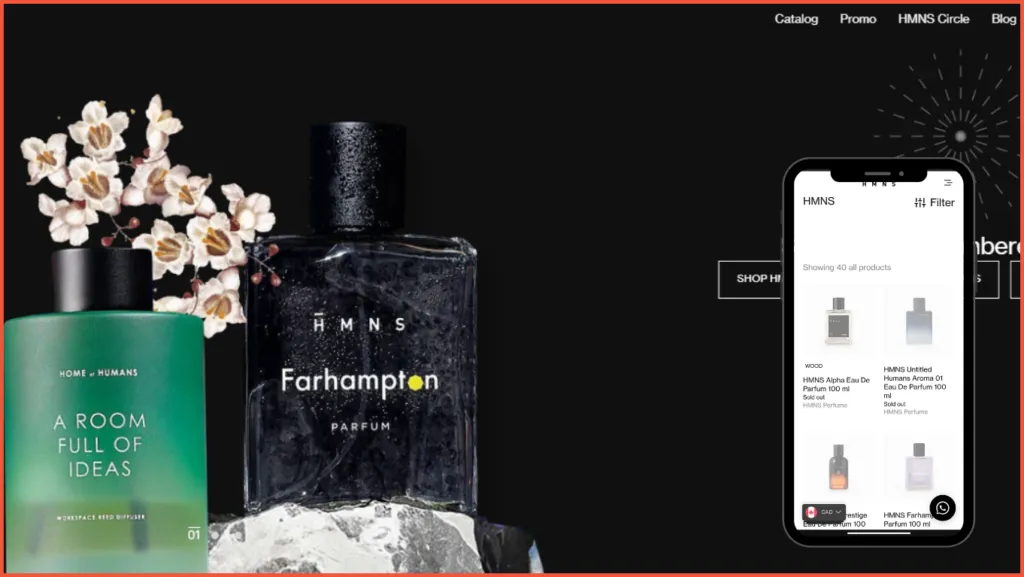
HMNS Perfume is a popular and rapidly growing Indonesian fragrance brand. The brand has developed a minimalist and product-focused catalog website that showcases its range of experimental fragrances. Despite its minimalist design, the website has a strong and distinctive brand character.
Known for its range of unique fragrances, HMNS also offers products such as Hair & Body Mist, Reed Diffusers, and other items under its Home of Humans catalog.
Every product is presented with visuals, descriptions, prices, fragrance notes, and volume, creating a clear layer of information within the product listing. These details make the HMNS website more engaging because the products become the focal point of an experience that helps customers understand items they cannot physically try before ordering them.
The HMNS website also includes a Currency Converter that allows international customers to view product prices in their preferred currency. It also provides a Download Catalog feature, which allows customers to download the complete HMNS product catalog. The catalog is available as a PDF file, so customers can access the information even when an internet connection is not available.
For businesses looking to build a website focused on product discovery without relying on a conventional product grid, the HMNS website offers an interesting reference. Beyond its elegant visual appearance, the product catalog is carefully curated around product characteristics and sensory information through descriptions, scent types, fragrance notes, longevity, sillage, and projection.
Another interesting aspect is how the homepage adapts to different devices. For customers accessing it via desktop, the HMNS homepage features articles and stories about the brand, while the mobile version takes a more direct approach by displaying the product catalog instantly.
2. Zalora Indonesia
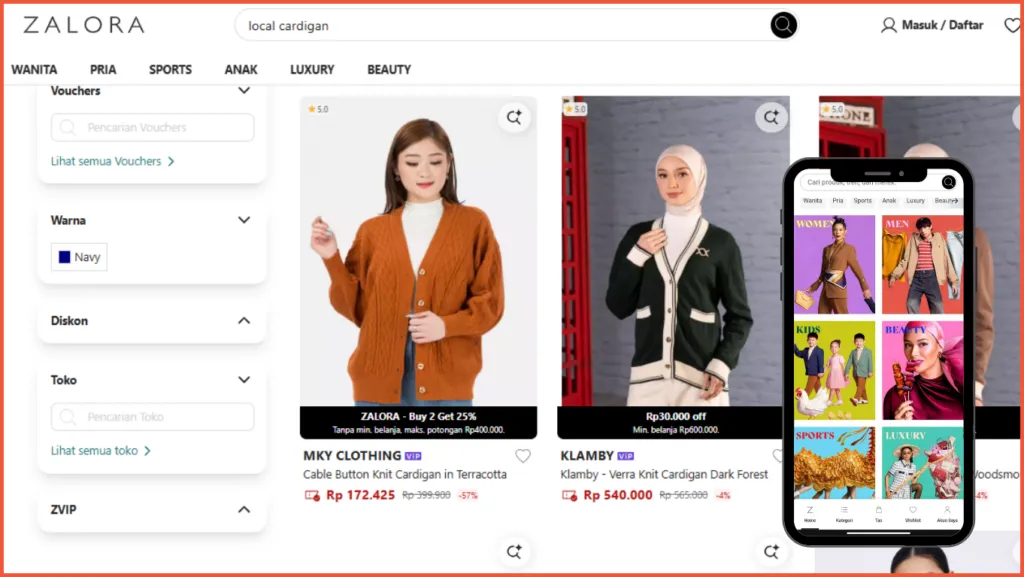
ZALORA Indonesia shows a large-scale product catalog focused on product discovery and transactions. The platform itself states that its website is home to more than 150,000 products, making it a large-scale product catalog that brings together thousands of brands and product categories within a single platform.
To make product discovery easier, the ZALORA catalog is equipped with highly detailed filters and shopping features that help users find products based on specific preferences, including size, color, price, and product condition. This level of filtering makes the shopping experience feel highly personalized, particularly for customers looking for specific products.
ZALORA Indonesia’s Product Index (A-Z) also contains an extensive list of products and search terms, ranging from clothing, shoes, skincare, and fragrances to products organized by brand or specific characteristics. This shows how ZALORA’s information architecture is designed to handle a very large product catalog while giving users multiple ways to discover what they want.
Although product discovery is the main focus of the experience, ZALORA’s website also has a strong editorial and inspirational component. The homepage provides various entry points based on fashion needs, while certain categories and pages incorporate editorial content to help users discover new products and find inspiration.
So, how does a platform with such a massive product catalog keep its UI/UX manageable? ZALORA Indonesia combines a functional, information-dense interface with a strong focus on product discovery, creating a shopping experience that helps users navigate an extensive catalog without losing sight of the products themselves.
3. Indonesia One Stop Centre
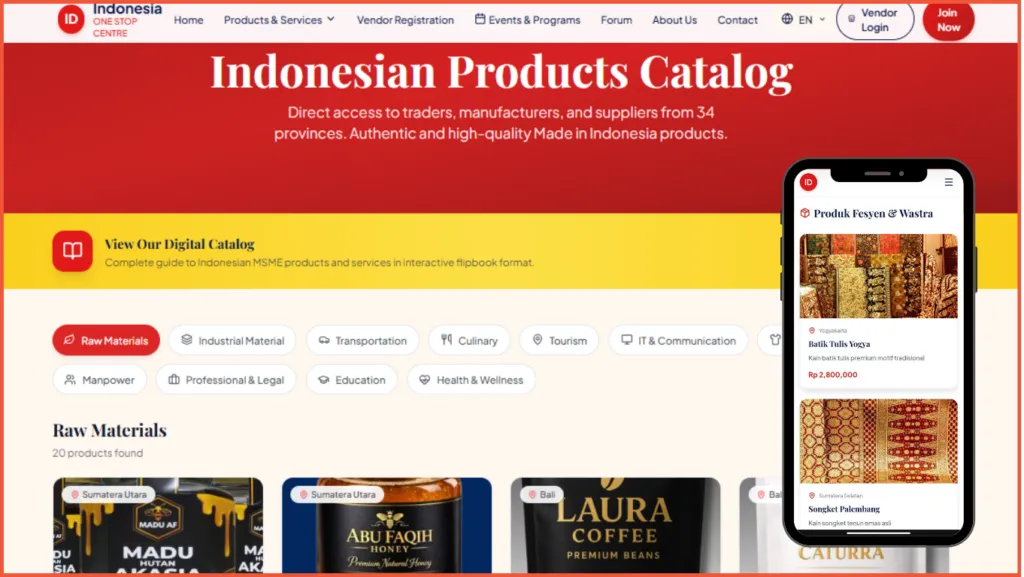
Indonesia One Stop Centre (IOSC) is an example of a product catalog website that takes a broader approach, covering a wide range of categories from raw materials, industrial materials, transportation, food and beverage, tourism, IT and communications, fashion, and labor to professional services, education, and healthcare. This breadth reflects IOSC’s role as a platform offering more than 10,000 products, 500 vendors, and 11 industry categories.
The IOSC homepage has a corporate, functional, and information-oriented character, relying heavily on category structures, numbers, content cards, CTAs, and concise information. Its hero section immediately communicates the platform’s positioning as a place that connects traders, importers, and business owners with products and business solutions in Indonesia.
IOSC also organizes its information architecture around three primary user pathways: Explore Products, Register as a Vendor, and Register as a Buyer, giving the website a clear business-matching orientation. To further support the user experience, IOSC also provides a digital catalog in an interactive flipbook format, so the catalog is not limited to standard web pages. Users can access a more structured version of the catalog that is easier to read and share.
From a UX/UI perspective, the IOSC website prioritizes a functional and information-rich interface that helps users explore products, services, and vendors based on their business requirements. For businesses planning a B2B catalog website that brings together products, services, and vendors, IOSC offers an interesting reference for structuring a broad and information-intensive digital catalog.
Product Catalog Websites Developed by Tonjoo
Beyond the examples from other businesses, Tonjoo has also developed product catalog websites designed around specific business requirements. The following projects offer useful references for companies considering a product catalog website, particularly for seeing how product catalogs and supporting features can be structured to help customers discover products and move toward a purchase.
Polo Country Indonesia

Polo Country Indonesia is an example of a product catalog website for a fashion brand developed by Tonjoo. Its product catalog is organized into categories, making it easier for visitors to browse the available clothing and fashion products.
On each product detail page, visitors can review product information before making a purchase decision. The bottom of the page also features related product recommendations that are relevant to the item being viewed. This helps visitors discover alternative products or explore other options that may suit their preferences without returning to the main catalog.
Once visitors find a product they want to purchase, they can add it to their shopping cart and proceed to checkout. The checkout flow on the Polo Country Indonesia website is relatively straightforward. Customers simply need to enter their shipping information and select a payment method to complete the order.
Unakaffe System

The coffee capsule brand Unakaffe System has a product catalog website developed by Tonjoo to introduce its products. On the product page, visitors are presented with a catalog divided into two main categories: Capsule Coffee Machines and Capsule Coffee. Each category includes a brief description and a button to view the products, allowing visitors to go directly to the product group that matches their needs.
This approach can be particularly useful for companies offering multiple product lines with different characteristics. Rather than displaying all products at once, Unakaffe uses categories as the starting point for navigation. Once visitors select a category, they can browse the available products and open individual product pages for more detailed information.
The Unakaffe System website does not provide a direct checkout process. Once visitors have decided which product they want to purchase, they are directed to a marketplace to complete the transaction. This makes the website function primarily as a digital catalog, while the actual purchase takes place through the brand’s designated marketplace channels.
InovaKit

InovaKit is a product catalog website developed by Tonjoo for a business offering a wide range of iron and stainless steel products. The catalog includes medical equipment, mosque supplies, office equipment, kitchen sets, trolleys, and funeral equipment. On the product page, the catalog is divided into 14 categories and features more than 100 products.
Each product is presented with a photo, product name, category, price, discount information, and an Add to Cart button. Visitors can open the product detail page to access more information before deciding what to purchase. This makes it easier for potential customers to compare products and find the information they need in one place.
InovaKit uses its website for more than simply displaying products. Visitors can complete their purchases directly through the website by adding products to their cart and proceeding to the checkout page, where they can enter their order details and complete the transaction using the available payment methods.
For customers with more specific requirements, the website also provides free consultation via WhatsApp. This feature is particularly relevant for a manufacturing business, as not every customer requirement can be addressed simply by selecting an existing product from the catalog. Customers looking for customized products or wanting to adjust a product based on specific requirements can consult with the InovaKit team before placing an order.
Choosing a Product Catalog Website Based on Your Business Needs
Those are some examples of product catalog websites that can offer useful references. The right approach depends on factors such as the number of products, customer characteristics, and the company’s sales process. Not every business requires the same features. Some may only need a product catalog and consultation options, while retail businesses may require a complete path from product discovery and shopping cart to payment.
For this reason, the website structure and feature requirements should be considered from the early stages of development. You can explore Tonjoo’s website development process to see how the development process can be structured around business requirements. If you are looking for a website designed around your business processes, Tonjoo can help develop a website with relevant features and user flows.
Updated on September 23, 2026 by Anisa K.
